A good Apple TV remote makes the whole setup feel easier. But the wrong one turns simple things into small annoyances. Most of the time, people notice this when the buttons stop responding or the touch area feels too jumpy.
However, finding a steady and comfortable replacement becomes the real task. Each remote handles basic control in its own way. In that case, remotes fall into two groups. Official remotes keep voice and clickpad features. And third-party remotes trade gestures for physical buttons, IR simplicity, or broader device control. Each choice changes the way you find shows, set volume, and control a home theater.
This guide walks through the options that work well with your Apple TV and helps you see which one fits your everyday use without any guesswork. So let’s get started to find out the best Apple TV remote.
Quick summary of the top Apple TV remotes
Below is a short snapshot to help you decide fast. The Siri Remote (3rd generation) prioritizes precise navigation and voice search. The Function101 Button Remote prioritizes simple tactile buttons and a long IR range. The SofaBaton U2 prioritizes universal device control and Bluetooth LE pairing. The SteelSeries Nimbus+ prioritizes gaming input and long battery life. Each pick uses a different connectivity method and suits a clear use case. Introduce a compact comparison table next. The table uses explicit attributes so readers can scan specs, connectivity, and best use cases quickly.
| Remote | Key features | Connectivity | Battery / Charging | Best for |
| Siri Remote (3rd generation) | Clickpad circular scrub, Siri voice, aluminum body | Bluetooth, IR for TV control | USB-C recharge, months per charge | Editor’s choice for navigation. |
| Function101 Button Remote | Physical buttons only, large keys, simple layout | IR (line of sight) | Uses replaceable coin cell or specific model batteries | Best for seniors and button-first users. |
| SofaBaton U2 | Activity macros, app switching, and backlit keys on variants | Bluetooth LE (pairing to Apple TV) | Rechargeable, model-dependent | Best universal remote for multi-device setups. |
| GE Universal Remote | Affordable programmable codes, TV/volume control | IR | Battery type AA/AAA, depending on model | Budget replacement that controls TV power and volume. |
| Channel Master Simple Remote | Navigation pad, basic playback buttons, no gestures | IR, plug-and-play with Apple TV | AA batteries | Best simple replacement when the original remote is lost. |
| Logitech Harmony Elite | Activities, smart hub, advanced macros | RF hub to hub, IR to devices, app setup | Rechargeable | Best for full AV racks and automated setups. |
| SwitchBot Universal Remote | Smart hub integration, automation via app | IR through hub, Matter/voice integrations on newer hubs | Hub powered, remotes vary | Best for smart-home automation and scene control. |
| SofaBaton X1S | Large device library, macro support, backlit buttons | Bluetooth and IR options | Rechargeable | Good midrange universal remote for mixed setups. |
Quick picks
- Editor’s choice – Siri Remote (3rd generation) for precise navigation and built-in Siri voice search.
- Best budget – GE Rechargeable Universal Remote for reliable TV power and volume control at a low cost.
- Best universal –SofaBaton U2 for Bluetooth LE pairing and multi-device macros.
- Best for seniors – Function101 Button Remote for large physical keys and 30-meter IR range.
Apple’s Official Remotes
The official remotes usually feel more refined than most third-party options because they’re built around Apple’s layout, smooth scroll, and tight Bluetooth pairing. The newer versions also fix many small issues that bothered long-time Apple TV users, so the experience feels more direct and clear. Most people who want the safest choice, this one fits perfectly. Because the setup is quick and the controls match tvOS perfectly.
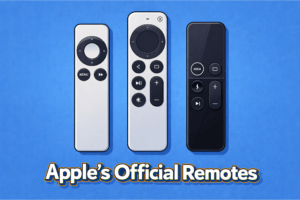
Apple TV Siri Remote (3rd Generation)
The third-generation Siri Remote keeps the same aluminum body shape that Apple introduced earlier. And it adds USB-C for faster and more convenient charging. The buttons sit close together but feel clear under the thumb. And the clickpad ring gives steady directional control without slipping. The build feels dense and balanced.
Key Features
- USB-C charging port
- Touch-enabled clickpad with precise ring control
- Bluetooth 5.0
- Dedicated power and mute buttons
- Aluminum unibody shell
- Built-in Siri mic
Compatibility
- Apple TV 4K (2021, 2022, 2024 models)
- Apple TV HD
Pros
- Accurate clickpad with smooth swipe response
- The aluminum shell feels sturdy
- USB-C charging is quick and convenient
- Tight Bluetooth pairing with low input delay
- Volume and power buttons work well with most TVs
Cons
- A small body can slip between couch cushions
- No built-in tracking option
- Higher price than basic third-party remotes
Hands-On Experience / User Experience
I compared it to older Apple remotes that had the glass top, and this one felt far more durable. The clickpad is resistant to scratches and doesn’t pick up fingerprints. It also solved the accidental swipe problem that made the first-gen Siri Remote frustrating at times.
Against third-party options I tested, this one felt more predictable because the gestures matched tvOS perfectly. Some universal remotes handled basic navigation well, but none matched the clickpad’s speed when moving across long content rows. I ran it through regular use during a full week, and the battery dropped slowly. So a single charge lasts several weeks for most people.
Best Third-Party Remotes for Apple TV
The third-party remotes trade Apple gestures for simpler buttons, broader device control, or extra programmability. I tested several popular choices to show real experience. And I found the 9 best options in my experience. Each review below shows direct comparisons to the Siri Remote so you can pick by use case.
Function101 Button Remote
The Function101 Button Remote keeps a familiar layout that feels close to older Apple TV designs and replaces touch gestures with clear physical buttons. It helps you avoid the usual swipe mistakes and gives you steadier control right away. You get clear physical buttons, so moving through apps feels easier. The Bluetooth link keeps your Apple TV responding even if the box sits behind the screen. It also supports infrared to handle power, volume, and mute on over one hundred TV and audio brands. The body feels light in the hand, and the space between the buttons makes it easy to use. You can navigate the remote without looking down.
Key Features
- Bluetooth Low Energy navigation
- Infrared control for TV, soundbar, and receiver
- Supports two devices
- Runs on two AAA batteries included in the box
- USA phone and email support with QR setup link
- Works with all Apple TV and Apple TV 4K models
- Sonos volume control available through IR setup in the Sonos app
Compatibility
Apple TV and Apple TV 4K across all models, including early and recent generations
Compatible with many TVs, receivers, and soundbars through IR programming
Pros
- Simple physical layout makes everyday use easy
- BLE avoids a strict line-of-sight to the Apple TV box
- IR covers volume and power across many brands
- Batteries included for immediate use
Cons
- No Siri voice search
- IR functions still need a line-of-sight for the TV and receiver
- Limited to two devices
Hands-On Experience / User Experience
I paired it with my Apple TV, and the BLE connection held steady even with the box tucked behind the screen. The IR setup took a few tries with my soundbar, but once it paired, the volume keys responded well. The buttons have a light click that feels natural in the dark, and I liked the way the directional pad kept movement predictable across long menu rows. Since it runs on AAA batteries, I didn’t think about charging, and the remote held the same responsive feel across daily use.
SofaBaton U2 Universal Remote
The SofaBaton U2 replaces a bundle of remotes with one device. It supports up to 15 devices, including TV, soundbar, streaming box, and so on. The OLED screen and backlit keys make it easy to use in the dark. Also, its macro button fires multiple actions with a single press. So you can start a movie without extra steps.
You can set it up with the SofaBaton app. The remote offers three setup paths IR, Bluetooth, and IR learning, which helped me add both new and older Apple TVs. The IR range can reach about 35 feet, and its scroll wheel makes switching devices feel fast and secure.
Key Features
- Supports up to 15 devices
- Database with 6,000+ brands and 500,000+ device codes
- Backlit buttons for low-light use
- Custom macro commands for multi-step actions
- Scroll wheel for device switching
- OLED display with adjustable brightness
- SofaBaton App for setup, button editing, and cloud code access
- IR mode, Bluetooth mode, and IR learning mode
- Larger buttons and improved battery cover
Compatibility
Works with Apple TVs, DVD and Blu-ray players, home theater gear set set-top boxes, streaming devices, and televisions.
Not compatible with Wi-Fi-only devices, but SofaBaton can add unsupported models to the database on request.
Pros
- Cuts down remote clutter by handling many device types
- Backlit keys make late-night use easier
- Long IR range gives you flexibility in room placement
- Macro support saves time when powering up a full setup
- App setup is straightforward
Cons
- App setup can feel slow for non-technical users
- IR still needs a line of sight
- Not for Wi Fi only gadgets unless added to the cloud database
Hands-On Experience / User Experience
I set it up with the app, and the first few devices added in seconds because the code list recognized their model numbers right away. The OLED screen woke up as soon as I picked up the remote, which felt helpful in a dim room. In a large living room, the 35-foot IR range kept commands reliable from the couch.
GE Rechargeable TV Remote
This GE remote saves you the hassle of swapping batteries and keeps the controls simple. It feels light in the hand, and the slim shape fits well on the couch arm. With the one-touch app keys, you can start streaming with fewer presses. You can set up your Apple TV very easily. It also has preprogrammed app hotkeys for Netflix, Disney+, Prime Video, and YouTube.
Key Features
- Rechargeable.
- Design with a USB charging cable
- Power stays for months on a single full charge
- Indicator light to show charging status
- Controls up to 4 devices.
- Large code library.
- Easy automatic code search and direct code entry options
- Backlit keypad
Compatibility
Works well with Bluetooth Apple TV and Apple streaming devices. But it is not designed for IR IR-compatible 2nd-gen Apple TV,
Pros
- No need to buy batteries every few months
- Quick app buttons cut down navigation time
- Simple setup options for non-technical users
- Slim white design blends cleanly with Apple TV
Cons
- Not compatible with RF-only Apple TV
- Lacks deep customization and macros found on premium universal remotes
Hands-On Experience / User Experience
I tested it with Apple TV, and the basic controls worked as long as the box stayed in clear view. The backlit keys helped during late-night browsing, and switching devices felt quick. The charge held steady through regular Apple TV use without any slowdown.
Channel Master Simple Remote
The Channel Master Simple Remote gives Apple TV users a simple way to handle Apple TV without dealing with touch gestures. It works right out of the box with Apple TV and Apple TV 4K. You can also link it with most TVs or soundbars to manage power and volume without switching remotes. Also, the body feels light, and it’s about 100 grams. It stays focused on basic control and keeps the experience familiar for anyone who prefers physical buttons.
Key Features
- IR control with a 30-foot range
- Pre-paired for Apple TV and Apple TV 4K
- Basic navigation with Home, Menu, Play, and Arrow keys
- Supports power, volume, and mute on TVs and soundbars
- Built-in code search for setup
- Runs on two AAA batteries included in the box
- Works with Channel Master DVR+ and Stream+
- Lightweight 100-gram body
Pros
- Works instantly with Apple TV
- Simple button layout helps avoid mistakes
- Universal setup supports most TVs
- Lightweight build feels easy to hold
Cons
- IR needs a clear line of sight to the Apple TV box
- No Siri or Bluetooth voice control
- Controls only one extra device
Hands-On Experience / User Experience
I paired it with my Apple TV, and it’s so easy to navigate. With the Home button, I can easily go back to the main screen whenever I change apps. And the IR response stayed smooth when the box was in view. I can easily control the volume in a single attempt. It felt easy to use during long browsing sessions as the buttons had a predictable click in low light.
Logitech Harmony Elite
The Harmony Elite makes your living area clutter-free. Because it can replace many controllers with one hub-driven system. It handles up to 15 devices, so your TV, set-top box, soundbar, and smart lights all work together. The included Harmony Hub sends commands through walls and closed cabinets. So, you don’t need to point the remote.
However, Logitech already supports more than 270,000 devices, which makes pairing easy most of the time. Also, Alexa voice control works with the hub. So, you can use voice to start an activity or change a channel on your Apple TV.
Key Features:
- Controls up to 15 devices
- Works with 270,000 plus devices in the Harmony database
- Harmony Hub relays signals through walls and cabinets
- Create unlimited one-touch or time-based activities
- Mobile app for iOS and Android to personalize controls
- Alexa integration for voice commands
- Wi Fi Supports 802.11g/n
- One lithium polymer battery included
Pros
- Replaces many remotes and clears clutter
- Hub removes line-of-sight limits and improves reliability
- The app gives each person a personal remote profile
- Strong device coverage reduces guesswork during setup
Cons
- Setup takes time because you can customize many actions
- Cost is higher than basic universal remotes
- Full features depend on a stable home Wi Fi network
Hands-On Experience / User Experience
I linked the hub to my Apple TV and a soundbar. And the TV activates everything when you set the right HDMI input with one tap. The hub kept the Apple TV responsive even when the box sat inside a closed cabinet. Using the phone app made it easy to tweak an activity without hunting for small buttons on the main remote.
SwitchBot Universal Remote
The SwitchBot Universal Remote brings many living room controls into one compact device. It supports up to 25 devices. And that means your TVs, air conditioners, fans, lights, and projectors can work under one controller. It also has a touch wheel and 19 buttons to keep common navigation easy for kids and older family members. Its Battery life is 2000 mAh and it lasts for 150days per charge. So you don’t need to charge it every week.
Key Features
- Supports up to 25 devices total, with 10 IR and 15 Bluetooth slots
- Built-in infrared code library for 100,000 models
- Works on 2.4 GHz Wi Fi
- Hub 3 pairing adds Apple Home support for automations
- Buttons rated for 100,000 presses and strong physical feedback
- 2000 mAh battery
- Advanced IR customization via Hub 3
Pros
- Large device capacity reduces the number of remotes on the couch
- Long battery life means less charging hassle over months of use
- Durable buttons
- Available smart home routines for automation
Cons
- Only works on 2.4 GHz Wi Fi which may limit some network setups
- Not built for RF or 5 GHz Bluetooth devices in mixed setups
User Experience
I added my Apple TV in minutes with the SwitchBot Universal Remote Control. It works well once I pair the Hub 3. The remote stayed responsive during normal Apple TV viewing, and the battery indicator did not drop after several days of use.
SofaBaton X1S Universal Remote
The SofaBaton X1S makes a heavy setup feel simple. Because it supports up to 60 devices within one remote. Its thumb scroll wheel speeds switching, and you can move easily from Apple TV to a soundbar. Also, its backlit keys help when the room is dark, and the voice control hooks into Alexa and Google Assistant. The Hub gives a full 360-degree signal and you can send commands without a clear line of sight.
Key Features
- Supports up to 60 devices
- Cloud code library with 500,000 devices
- Hub with 40-foot infrared range and two IR blasters
- A rechargeable battery works up to 45 days per charge on normal use
- Custom macros that chain up to 10 commands per button
- Voice control compatible with Alexa and Google Assistant
- Wi Fi, Bluetooth, and IR connectivity options
Pros
- Two IR blasters cut signal blind spots
- Long battery life
- Macro buttons let you start a whole setup with one press
- App and API options give power users room to customize
Cons
- A full setup can take time if you customize many activities
- Voice assistants require account linking
Hands-On Experience / User Experience
I paired the X1S with my Apple TV, and the hub kept the box responsive even when it sat inside a cabinet. I feel the remote light in hand, and the battery did not dip after several days of normal Apple TV use.
How to Choose the Right Apple TV Remote?
Choose a remote that matches your setup, control style, and budget, and is also compatible with Apple TV.
First, prioritize how you like to navigate. If you prefer gestures and voice, pick the Siri Remote (3rd generation). If you want physical keys and no swipes, choose Function101 or Channel Master. If you need one remote for many devices, choose a universal remote control. Also, check the battery and charging type. Because USB-C, replaceable AAA, and long-life packs affect daily use. Finally, confirm connectivity types such as Bluetooth, IR, Wi Fi, and whether the remote supports HDMI-CEC or a hub for hidden setups.
Here is a quick compatibility table to match remote models against Apple TV versions:
| Remote | Connectivity | Apple TV models supported |
| Siri Remote (3rd generation) | Bluetooth 5.0, IR for TV | Apple TV HD and Apple TV 4K (2017, 2021, 2022, later) |
| Function101 Button Remote | Bluetooth Low Energy plus IR | Apple TV and Apple TV 4K families |
| SofaBaton U2 | IR and Bluetooth | Apple TV via IR or Bluetooth |
| SofaBaton X1S | IR, Bluetooth, Wi Fi via Hub | Apple TV via IR/Bluetooth, Hub for hidden setups |
| GE Rechargeable Remote | IR | Apple TV with IR control |
| Channel Master Simple Remote | IR | Apple TV and Apple TV 4K |
| Logitech Harmony Elite | Hub with RF to hub, IR, Wi Fi | Apple TV via hub or IR |
| SwitchBot Universal Remote | IR and Bluetooth, Hub 3 for Matter | Apple TV via IR or Bluetooth |
How do we choose the best Apple TV remote?
We pick the remote that solves your three biggest needs first, which are navigation style, device count to control, and how you want to charge or power the remote.
We start with navigation because it controls daily use. Gesture and voice make searching fast, so the Siri Remote wins there. We choose Function101 or Channel Master for seniors and kids. Because physical buttons reduce mistakes. Next, we choose based on how many devices a remote must control. If you need one remote for many gadgets, we prefer a universal option.
Then we check the power and charging. USB-C recharge suits busy households while replaceable AAA batteries remove charging pauses. Finally, we confirm connectivity for your layout. A hub that relays signals helps when the Apple TV sits in a cabinet. HDMI-CEC support can let a remote control TV power and volume without extra programming.
We use this quick checklist to score contenders for your setup:
- Navigation style matchs
- Device count coverage
- Charging preference and actual battery life
- Connectivity types including BLE, IR, Wi Fi, and hub relay
- Extra needs like macros, app hotkeys, gaming layout, or smart home integration
FAQs
Will a universal remote work with Apple TV?
Yes, as long as the remote supports Apple TV through IR or Bluetooth. Check the model list because some older remotes only send basic IR commands.
Can third-party remotes use Siri?
No, Siri works only on the official Apple TV remote. Other remotes may offer voice features, but they don’t link to Siri.
What should I try if my remote stops responding?
Check the charge, restart the box, and pair it again. Weak power or lost Bluetooth sync causes most control issues.
Which remote is easiest for seniors?
A button-only remote with large keys works best. Simple layouts avoid swipe gestures and keep navigation steady.
Conclusion
The choice of the best Apple TV remote becomes much easier when you look at what you actually do on your screen. Some people only jump between a few apps, while others switch inputs, sound, and extra devices in the same sitting. Once you match those small habits with the features of each remote, you can choose the right one without much effort. The good thing is that every remote here covers a different style of control. In the end, you just want a remote that feels steady in the hand and responds the moment you press, and that simple comfort brings the whole setup together again.